

Is a laptop worth ₱130,000 just because it has AI? That’s the question worth asking as ASUS Philippines introduces the new ASUS Zenbook 14 (UX3480) series, a lineup of ultraportable laptops designed for professionals, creatives, students, and anyone who wants a powerful computer without carrying around a brick.
Officially launched in the Philippines, the new Zenbook 14 combines lightweight design, OLED displays, next-generation processors, and AI-powered computing in a premium package. It also introduces ASUS-exclusive Ceraluminum craftsmanship, bringing a distinctive ceramic-like finish to a laptop designed for everyday mobility.
But here’s the thing: AI features are becoming increasingly common, so what makes this laptop worth considering in 2026? And with prices starting at ₱76,995 and reaching ₱129,995, which configuration deserves your hard-earned money?
Let’s break it down.
ASUS Zenbook 14 (UX3480): A Laptop That Wants to Travel in Style
What's Inside
Let’s start with the design because, yes, some of us care about how our gadgets look. A laptop can be powerful and practical without looking like a boring office appliance.
The new ASUS Zenbook 14 introduces Ceraluminum, an ASUS-exclusive material designed to combine the lightweight qualities of aluminum with a distinctive ceramic-like texture and finish. It’s intended to offer a premium tactile experience while helping the laptop withstand the demands of everyday use.
The series comes in three nature-inspired colors:
- Arctic Blue – for a clean, modern look.
- Komodo Coral – for those who want something a little more expressive.
- Zabriskie Beige – a neutral option that pairs well with practically any workspace.
The chassis weighs as little as 1.1kg, making it a practical companion for people who regularly move between home, the office, cafés, and airports.
Of course, premium materials and pretty colors don’t automatically justify a premium price. What matters is whether the laptop can deliver the durability, performance, and convenience you expect for the money.
Copilot+ PC: What Does AI Actually Bring to the Table?
The ASUS Zenbook 14 is part of the Copilot+ PC category, with configurations powered by Intel, AMD, and Snapdragon processors.
Here’s a quick look at the available platforms:
- Intel Zenbook 14 (UX3480AA): Up to Intel Core Ultra 9 386H.
- AMD Zenbook 14 (UX3480KA): Up to AMD Ryzen AI 7 345.
- Snapdragon Zenbook 14 (UX3480QA): Snapdragon X processor.
Each platform includes a dedicated neural processing unit (NPU), with the lineup advertised as delivering up to 50 TOPS (trillions of operations per second) of AI performance, depending on the configuration.
In everyday use, AI-enabled computing can support compatible productivity tools, creative workflows, and selected tasks that benefit from local AI processing. The actual experience will depend on the processor, software, and application you’re using.
ASUS has also upgraded the thermal system to support up to 35W TDP, representing a reported 25% increase over the previous generation. This gives the system more thermal headroom for workloads that benefit from additional power.
However, let’s not confuse AI specifications with automatic productivity. A dedicated NPU won’t magically make you a better writer, designer, or spreadsheet wizard. If your workflow doesn’t use AI features, you may not notice much benefit from that hardware alone.
My take? Choose an AI PC because its capabilities solve a real problem in your workflow, not simply because the words “AI-powered” appear on the box.
OLED Display, Dolby Atmos, and Fewer Dongle Emergencies
The Zenbook 14 features a 14-inch OLED display with a 16:10 aspect ratio, offering a taller workspace than a traditional 16:9 screen.
That extra vertical space can be useful when writing articles, editing documents, browsing websites, and working with multiple windows. OLED technology also makes the display an appealing option for people who enjoy rich colors and deep blacks when watching movies or consuming other media.
For entertainment, the laptop features dual speakers enhanced by Dolby Atmos.
Connectivity is another practical consideration. The series includes USB-C, USB Type-A, HDMI, and a 3.5mm audio combo jack, allowing users to connect a range of accessories and displays without automatically reaching for an adapter.
For remote workers, digital creators, and people who use their laptops as their main productivity machines, those everyday conveniences can matter just as much as headline-grabbing specifications.
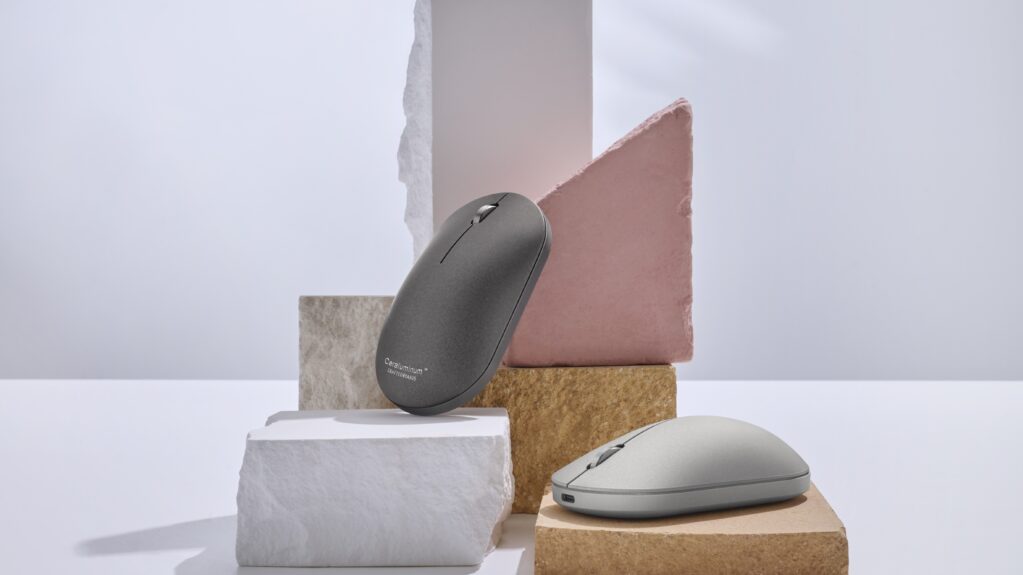
Meet the ASUS ZenMouse MD202
ASUS is also introducing the ZenMouse MD202, a premium mouse designed to complement the Zenbook’s Ceraluminum aesthetic.
Available in Moher Gray and Scandinavian White, the mouse offers several features aimed at people who work across different devices.
Here’s what stands out:
- Track-on-Glass sensor: Designed to work on virtually any surface, including glass.
- Multi-device connectivity: Connects to up to four devices.
- USB-C fast charging: ASUS advertises up to 16 hours of use from just a one-minute charge.
For anyone juggling a laptop, desktop, and other compatible devices, multi-device connectivity can make switching between work setups more convenient.
The matching finish is a nice touch, too. But remember: aesthetics are a bonus, not a substitute for comfort, reliable tracking, and a price that makes sense for your needs.
ASUS Zenbook 14 Philippines Price and Specifications
Now for the part that matters to your wallet.
The ASUS Zenbook 14 (UX3480) series became available in the Philippines starting October 7, 2026, with introductory suggested retail prices ranging from ₱76,995 to ₱129,995 for the listed configurations.
Here’s the full lineup and its advertised specifications.
| Series | Model | Key Specifications | Color | Introductory SRP |
|---|---|---|---|---|
| Zenbook 14 | UX3480AA-U2489WSM | Intel Core Ultra 9 386H / 24GB RAM / 512GB SSD / 14-inch OLED | Arctic Blue | ₱129,995 |
| Zenbook 14 | UX3480AA-U2477WSM | Intel Core Ultra 7 355 / 16GB RAM / 512GB SSD / 14-inch OLED | Arctic Blue | ₱106,995 |
| Zenbook 14 | UX3480KA-U1137WSM | AMD Ryzen AI 7 345 / 16GB RAM / 512GB SSD / 14-inch OLED | Arctic Blue | ₱94,995 |
| Zenbook 14 | UX3480KA-U1135WSM | AMD Ryzen AI 5 330 / 16GB RAM / 512GB SSD / 14-inch OLED | Arctic Blue | ₱86,995 |
| Zenbook 14 | UX3480QA-U1004WSM | Snapdragon X / 16GB RAM / 512GB SSD / 14-inch OLED | Komodo Coral | ₱76,995 |
| Zenbook 14 | UX3480QA-U1204WSM | Snapdragon X / 16GB RAM / 512GB SSD / 14-inch OLED | Zabriskie Beige | Coming soon |
Note: The Snapdragon X Zabriskie Beige variant is scheduled for availability later in Q4 2026. Prices shown are introductory suggested retail prices and may vary by retailer or promotion.
Which ASUS Zenbook 14 configuration should you consider?
Snapdragon X: ₱76,995
This is the entry point into the lineup. It may be worth considering if you prioritize portability, everyday productivity, and a premium OLED display. Before buying, check whether your essential applications and accessories are compatible with the Snapdragon platform.
AMD Ryzen AI 5 330: ₱86,995
This configuration offers another option for users looking at the lower end of the Zenbook 14 price range. Compare its performance in your specific applications with the Snapdragon and higher-tier AMD models before deciding.
AMD Ryzen AI 7 345: ₱94,995
At this price, the AMD Ryzen AI 7 configuration may appeal to users who want more processing capability while keeping the price below ₱100,000.
Intel Core Ultra 7 355: ₱106,995
This model is an option for buyers who prefer Intel and want a higher-tier configuration without going all the way to the most expensive model.
Intel Core Ultra 9 386H: ₱129,995
This is the top-priced configuration listed in the lineup. Whether it makes sense depends on your workload and whether its additional capabilities justify spending more than ₱50,000 above the entry-level model.
Don’t pay for specifications you won’t use. Check the processor, memory, storage, software compatibility, and performance requirements of your everyday applications before making a decision.

What Freebies Come With the ASUS Zenbook 14?
ASUS is also offering software and cloud-storage incentives with the launch lineup.
The advertised bundle includes:
- A lifetime license of Microsoft Office Home 2024.
- One year of Microsoft 365 Basic.
- Three months of Google AI Pro.
These inclusions can add value, particularly if you already use the relevant services. However, it’s worth checking the exact redemption conditions, eligibility, and availability with the retailer before purchasing.
Remember that a lifetime Office license and a Microsoft 365 subscription are different products. Don’t assume every feature or service included in one is automatically included in the other.
Is the ASUS Zenbook 14 Worth Buying in 2026?
The new ASUS Zenbook 14 has several compelling features: a lightweight design starting at 1.1kg, a 14-inch OLED display, multiple processor choices, dedicated AI hardware, and a selection of premium finishes.
For frequent travelers, professionals, students, and creators who value portability, those features could make it an attractive laptop to consider.
But the price deserves scrutiny.
At ₱76,995, the entry-level model is already a significant investment. At ₱129,995, the flagship configuration enters a price range where buyers should carefully compare competing laptops and consider whether they truly need the extra performance.
The biggest question isn’t whether the Zenbook 14 has AI. It’s whether its particular combination of performance, portability, display quality, and build materials offers enough value for your workflow.
Because let’s be honest: a laptop can be beautiful, lightweight, and AI-ready, but that doesn’t mean everyone needs to spend six figures to get work done.
Where to Buy the ASUS Zenbook 14 in the Philippines
The ASUS Zenbook 14 (UX3480) series is available in the Philippines through ASUS sales channels, with the listed launch lineup starting October 7, 2026.
Visit the official ASUS Philippines Where to Buy page to find authorized retailers and stores.
For the latest announcements, follow ASUS Philippines on Facebook, Instagram, and TikTok.
Over to You, Earthlings!
Would you spend ₱129,995 on a premium AI laptop, or would you rather save the difference and put it toward other things?
And what matters most to you when buying a laptop: AI features, processor performance, battery life, display quality, portability, or price?
Tell us in the comments. Let’s talk specs, spending, and whether the AI PC hype is actually worth your money.

